What is a depth map, and how to make one from any photo
A depth map shows how far every pixel of a photo is from the camera. Learn how AI depth map generators work, what depth maps are used for, and how to get one from your own photo for free.
By the Deep Photo team · · 7 min read
Behind every 3D photo, portrait-mode blur and "make my photo move" effect there is the same simple picture: a depth map. It is one of the most useful things AI can pull out of an ordinary photo, and you can make one from any picture in a few seconds. Here is what a depth map is, how it is made, and what you can do with it.
What is a depth map?
A depth map is a grayscale image with the same size as a photo, where the brightness of each pixel stands for how far that point is from the camera. In most tools bright means near and dark means far. Some software uses the opposite convention, so always check before you use one in another program.

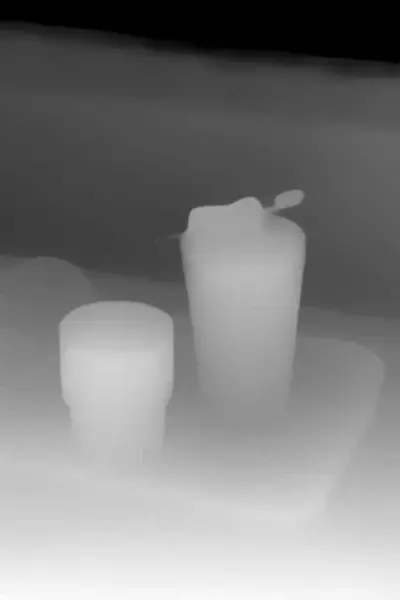
Unlike a 3D model, a depth map only describes what the camera can see. It has no information about the back of objects. That is exactly why it is so practical: it lines up pixel for pixel with your photo.
How depth maps are made
With hardware
Dual cameras compare two views of the scene, like our two eyes do. LiDAR and time-of-flight sensors measure distance with light. Phones use these for portrait mode and AR, and they save the depth inside the photo file, but only for photos taken that way.
With AI, from a single photo
Monocular depth estimation models learn depth cues from millions of images: perspective lines, object sizes, blur, shadows, what is in front of what. Given any single photo, they predict a depth map. The best-known open models are MiDaS, Marigold and Depth Anything. Deep Photo runs Depth Anything V2 directly in your browser, using your graphics card through WebGPU when it is available.
AI depth maps are relative: they get the order of things right (this cup is in front of that window) but not exact distances in meters. For creative uses that is all you need.
How to make a depth map from your photo, free
- Open Deep Photo and upload a photo (JPG, PNG or WEBP).
- Wait a few seconds while the model builds the depth map in your browser.
- Move your mouse over the result: the 3D effect you see is your depth map at work.
- Click Download depth map under the preview to save it as a grayscale PNG (bright = near).
Get the depth map of your photo
Free, no sign-up. Works with any photo, in the browser.
Make a depth mapWhat depth maps are used for
- 3D photos and parallax. Move pixels by their depth and a flat picture turns into a 3D photo.
- 3D videos. The same trick, frame by frame, with depth kept steady over time. See how to convert 2D video to 3D.
- Background blur. Blur pixels more the further away they are and you get a fake shallow depth of field.
- Blender and VFX. Use the depth map as a displacement map on a subdivided plane for a quick 2.5D scene, or for fog and depth-of-field in compositing.
- Laser engraving and CNC. Many engraving programs read a grayscale image as height, so a depth map becomes a relief. You may need to invert it, since engravers often burn dark areas deeper.
- Lithophanes and 3D-printed reliefs. Convert the depth map into a height field to print a relief of your photo.
- AI image generation. Depth maps are a common control input (for example ControlNet depth) to keep the layout of a scene when generating a new image.
What makes a good depth map
- Sharp, well-lit photos with a clear subject.
- Visible distance: something in front and something behind.
- Fewer reflective or transparent surfaces. Mirrors, windows and glass confuse every depth model.
Frequently asked questions
What does a depth map show?
A depth map is a grayscale image the same size as your photo where each pixel's brightness stands for distance. Usually white or bright means close to the camera and black or dark means far away.
Can I make a depth map from a single photo?
Yes. Monocular depth estimation models such as Depth Anything predict depth from one ordinary image. You don't need a depth sensor, a dual camera or several photos.
How do I get a depth map of my photo for free?
Upload the photo to Deep Photo. The AI builds the depth map in your browser in a few seconds, shows the photo in 3D, and lets you download the depth map as a grayscale image.
Is a depth map the same as a normal map or a displacement map?
Not quite. A depth map stores distance from the camera. A displacement or height map stores how far a surface sticks out, and a normal map stores which way a surface faces. In practice a depth map is often used as a displacement map, for example in Blender or for laser engraving.